Boo Casino Mobile App
There isn't one to download — and that turns out to be fine. Here is what the mobile build actually does, how to make it behave like an app, and the one download you should refuse.
The short answer
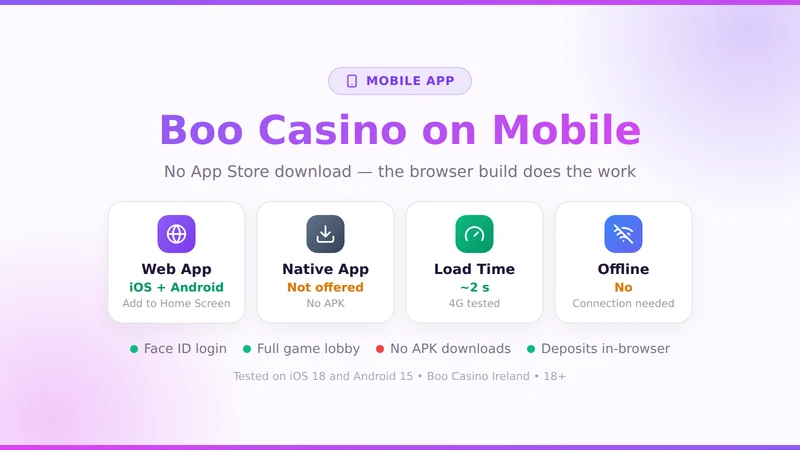
Boo Casino has no native app on iOS or Android. The mobile website carries the full lobby, the full cashier and biometric login, and adding it to your home screen gives you an icon that opens full screen with no browser bar. Anything advertising itself as a Boo Casino APK is not from the operator — do not install it.
Checked 2 September 2026 on iOS 18 (Safari) and Android 15 (Chrome).
"Where's the app?" is one of the most searched things about any casino brand, and the honest answer for most of them in Ireland is that there isn't one. Apple and Google both restrict real-money gambling apps to operators licensed in the specific market, and with Ireland's own online gaming licences still working their way through the new regime, most operators simply ship a very good mobile site instead.
Which is what Boo Casino has done. Below is what it can and cannot do compared to a native app, and a short diagnostic section for when something on mobile stops behaving.
Current status
Mobile site
Operating normally. Lobby, cashier and account section all responsive.
iOS App Store
No listing. Nothing published under this brand.
Google Play
No listing. Real-money gambling apps need a market-specific licence.
Third-party APKs
Circulating, unofficial, and best avoided entirely.
Make it behave like an app in 30 seconds
iPhone and iPad (Safari)
- Open the casino in Safari — not Chrome, the option only appears in Safari.
- Tap the Share button at the bottom of the screen.
- Scroll down and choose Add to Home Screen.
- Rename it if you like, then tap Add.
The icon opens full screen with no address bar, which is the only visible difference from a native app.
Android (Chrome)
- Open the casino in Chrome.
- Tap the three-dot menu, top right.
- Choose Add to Home screen or Install app.
- Confirm. The shortcut lands in your app drawer.
Samsung Internet works the same way under Add page to → Home screen.
Web app versus a native app
| Feature | Boo Casino mobile site | A typical native app |
|---|---|---|
| Full game lobby | Yes | Yes |
| Deposits and withdrawals | Yes, full cashier | Yes |
| Biometric login | Yes, via passkeys | Yes |
| Home screen icon | Yes, after Add to Home Screen | Yes |
| Push notifications | Limited on iOS | Yes |
| Offline play | No | No — real-money games need a connection either way |
| Storage used | Almost none | 80–200 MB, plus updates |
| Always current | Yes, nothing to update | Needs store updates |
About those APK downloads
Search for a casino app and you will find sites offering an APK file. None of them are the operator. An APK is an installable Android package, and sideloading one means granting an unsigned application whatever permissions it asks for — including the ability to sit over your banking app and read what you type.
There is no upside to it either. The file, at best, is a wrapper around the same mobile website you can open in Chrome for free. At worst it is credential theft with a casino logo on it.
If you have already installed one: uninstall it, change your casino password, and check that no accessibility permissions were left switched on for it in Android settings.
Fixes by symptom
A game loads to a black screen
Almost always a stale cache. Close the tab, clear the site data for the domain, reopen. If it persists on one title only, that game is being updated by its studio — try again in an hour.
Login loops back to the login page
Cookies are being blocked. On iOS check Settings → Safari → Prevent Cross-Site Tracking, and on Android check whether a privacy browser extension is stripping session cookies.
Deposit page will not load
Usually a VPN or a DNS-level ad blocker interfering with the payment provider's iframe. Turn both off for the session. If it still fails, the problem is more likely the card — the payments page has the decline checklist.
Everything is slow on mobile data
Slot assets are heavy on first load. After that they cache. Low Data Mode on iOS and Data Saver on Android both throttle that first load badly — turn them off before opening a new game.
The site logs me out every few minutes
Private browsing drops the session as soon as the tab is backgrounded. Use a normal tab, or the home screen icon, which keeps its own persistent session.
What happens to a spin if the signal drops
This worries people more than it should. A slot spin is settled on the game server the moment you press the button — the animation on your screen is a replay of a result that already exists. If the connection dies halfway through, the outcome is unaffected.
Reload the game and it will either show you the finished round or resume the feature you were in. Live dealer is the one exception worth knowing about: if you lose connection during a hand, the dealer plays on and your bet stands, which is why live tables are a poor choice on a patchy commuter train.
Who the browser build suits less well
Notification-driven players
If you rely on alerts for tournaments or drops, iOS web push is patchy. A native app would do this better.
Very old phones
Anything below iOS 15 or Android 9 will struggle with modern slot engines regardless of how it is packaged.
Anyone self-excluding
A home screen icon is easy to tap without thinking. If you are cutting down, remove it and use account limits instead.
Mobile questions
Is there a Boo Casino app for iPhone or Android?
No native app is published in the App Store or on Google Play. The mobile site does the same job in the browser, and you can add it to your home screen so it opens full screen with its own icon.
Should I download a Boo Casino APK?
No. Any APK claiming to be Boo Casino is from a third party, not the operator, and installing one means giving an unsigned package access to your device and your login. Use the mobile site.
What happens if my connection drops mid-spin?
The spin has already been settled on the server, so the outcome is fixed before your screen catches up. Reload the game and the balance will reflect the result. Nothing is lost by a dropped connection.
Can I use Face ID or a fingerprint to log in?
Yes, once you have logged in with your password and allowed the browser to store the credential. Safari and Chrome both handle this through the standard passkey prompt.
Does the mobile site have fewer games?
No. The lobby is identical because every title is HTML5. The only practical difference is that a few older slots still expect landscape orientation.
Can I deposit and withdraw from a phone?
Yes, the full cashier is available. Apple Pay and Google Pay are actually easier on mobile than on desktop, and Revolut deposits confirm with a push notification.
No download, no update, no storage
Open it in your browser and add it to the home screen — that is the whole install.
18+. Gamble responsibly. Support at Problem Gambling Ireland.